One of the most common questions we hear from MSPs and MSSPs in the defense supply chain is some version of: “How do we set things up so our systems stay out of scope during our clients’ CMMC assessments?”
It’s the right question to be asking. As we covered in our post on when MSPs need to be CMMC compliant, whether your organization gets pulled into scope depends heavily on whether you’re storing, processing, or transmitting CUI on your own systems. If you are, you need your own CMMC Level 2 certification — a burden most MSPs would prefer to avoid, or at least manage carefully.
The single biggest culprit that brings MSPs into scope? Their RMM tool.
Why RMMs Are a CMMC Scoping Problem
Remote Monitoring and Management (RMM) software is the operational backbone of most MSPs. It lets technicians remotely configure and patch systems, push updates, and troubleshoot desktops — all without leaving the office. For an MSP managing dozens or hundreds of clients, RMM platforms are non-negotiable.
The problem is that the same capabilities that make RMMs powerful make them a compliance liability. By design, RMMs require deep system access — often at the admin or root level. In many default configurations, that means an MSP technician sitting at their own desk could, in theory, navigate directly to a file containing CUI on a defense contractor’s system. From a CMMC scoping perspective, that level of access is enough to classify the MSP as a CUI asset.
And if you’re classified as a CUI asset without your own Level 2 certification, you’ll get swept into every one of your clients’ assessments.
4 Approaches to Reduce RMM Scope Risk
There’s no single universal fix here, and it’s worth noting upfront: CMMC assessors have discretion when it comes to scoping decisions, and not every approach below will satisfy every assessor. The right move is to have these conversations before you select your C3PAO and assessment team, not after.
With that caveat in place, here are the four approaches we see MSPs use most effectively.
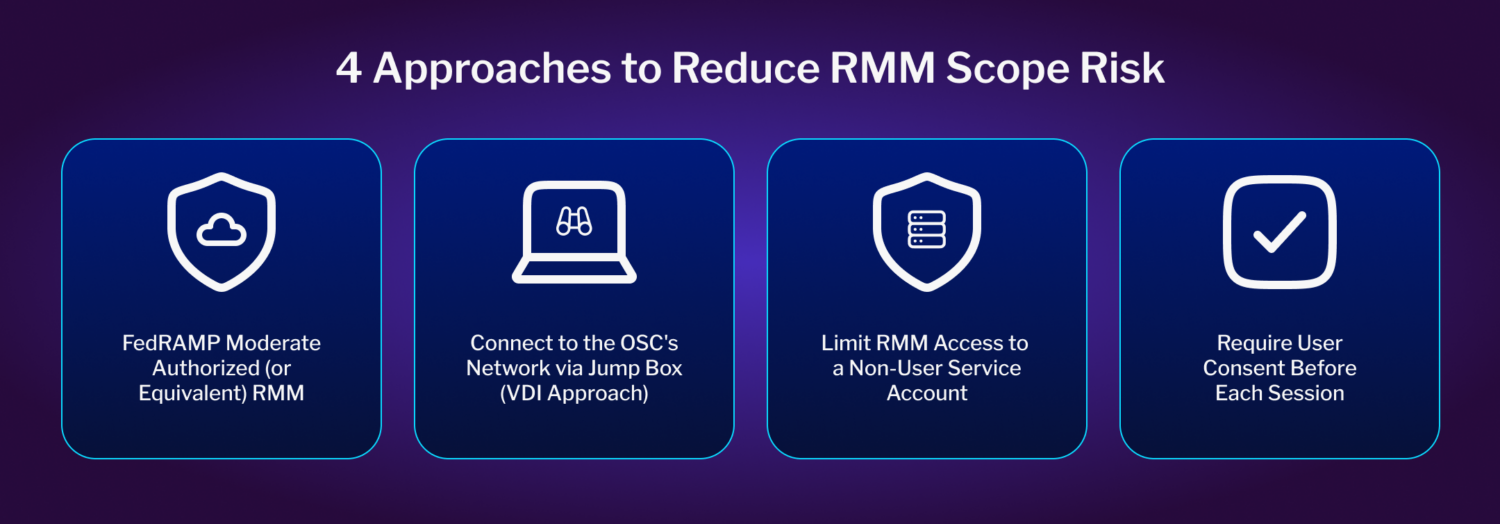
1. Use a FedRAMP Moderate Authorized (or Equivalent) RMM
Some RMM platforms have achieved FedRAMP Moderate Authorization or Equivalency, which means they’ve been independently validated as compliant for environments that store, process, or transmit CUI. Using one of these platforms doesn’t automatically take your MSP out of CMMC scope, but it does mean you’re handling that access through a compliant channel — which significantly reduces your overall assessment burden and requires minimal changes to your current operations.
If you go this route, verify the platform’s status in the FedRAMP Marketplace or confirm that they’ve achieved FedRAMP equivalency and confirm with your C3PAO how it factors into scoping.
2. Connect To the OSC’s Network Through a Jump Box (VDI Approach)
Rather than connecting your RMM directly from your MSP environment to your client’s network, this approach routes RMM sessions through a jump box deployed inside the client’s environment. Think of it as the virtual desktop infrastructure (VDI) model applied to remote access.
When configured correctly, the jump box acts as a one-way gateway: your technician can see and interact with the client’s systems, but no data can flow back to your MSP network. That separation is what keeps your systems out of the CUI asset category.
The configuration details matter enormously here; a jump box that isn’t properly locked down can defeat the purpose entirely, so this approach requires careful implementation and documentation.
3. Limit RMM Access to a Non-User Service Account
This approach addresses the root cause of the problem: RMMs typically have broad admin or root-level privileges because they’re used for a wide variety of tasks. That scope of access is what creates the compliance exposure.
Where your RMM platform supports it, configure it to operate through a service-level account that can handle OS-level tasks — patching, updates, troubleshooting — but cannot initiate a direct user session. The goal is to separate the operations layer from the data layer. If your technician can’t open a user session, they can’t accidentally (or intentionally) access a CUI-containing document.
Not all RMM platforms support this model, so review what your specific platform allows before committing to this path.
4. Require User Consent Before Each Session (Minimum Viable Option)
If your RMM doesn’t support service-level-only access and you can’t route through a jump box, this is the minimum you should be implementing.
Most RMM platforms allow you to configure session initiation so that a user at the client’s end must explicitly approve access before a remote session begins. That approval window gives the user time to close anything CUI-related before the technician can see the screen. It’s not a technical control – it’s a procedural one – which means it needs to be backed up by three things:
- Robust employee training on the compliance obligations around CUI access
- An acceptable use policy that explicitly acknowledges the end user’s responsibility in this scenario
- Complete logging of all RMM session activity so there’s a documented record that no CUI was accessed
This option places more compliance burden on your client’s end users, which is a meaningful tradeoff. It should be treated as a stopgap while pursuing one of the stronger technical approaches above.
A Note on Real-World Risk Beyond Compliance
The SolarWinds breach made clear what’s at stake when RMM access isn’t locked down. Attackers got into the platform itself and worked their way outward to thousands of customers. CMMC scoping rules exist partly because of attacks like that one.
Next Steps for MSPs
Haven’t mapped your RMM configuration against these approaches yet? Start there — then bring your findings to your C3PAO before finalizing your scope documentation.
And if you’re still working through the broader question of when your MSP needs its own certification, our post on MSP CMMC compliance is a good place to start.