HIPAA compliance for a dental office or chiropractic practice that emails PHI (protected health information, meaning any patient health data that identifies the patient) rests on the same standards of the HIPAA Security Rule, the federal safeguards for electronic PHI, that a hospital follows, scaled to the size of the office. The 12-item checklist below covers the requirements that apply most directly to email and file sharing, each tied to its section of 45 CFR Part 164 and marked required or addressable. An addressable specification is one the office must assess, then adopt it, adopt an equivalent measure, or document why neither is reasonable.
What does HIPAA compliance require of a dental office’s email and file sharing?
HIPAA requires a dental office to analyze risks to PHI in its email and file sharing, apply safeguards, sign a business associate agreement (BAA) with each vendor handling PHI, keep and review activity records, train staff and document its decisions. Audit controls are required. Encryption is addressable, and properly encrypted PHI that is lost does not trigger breach notification.
An addressable specification still has to be assessed. Under 45 CFR 164.306(d)(3), the office either adopts it, adopts an equivalent measure, or writes down why neither is reasonable for the practice.
Section 164.306(b)(2) also lets an office weigh “the size, complexity, and capabilities” of the practice and “the costs of security measures” when it chooses how to apply each standard. A small office can choose simpler measures, but each standard still applies.
What is on the HIPAA checklist for a dental or chiropractic office?
The checklist has 12 items drawn from the administrative safeguards in 45 CFR 164.308, the physical safeguards in 164.310 and the technical safeguards in 164.312. Each row gives the citation, whether the specification is required or addressable, and where PreVeil supports it.
Rows marked “office’s responsibility” are policies and procedures the office writes and owns.
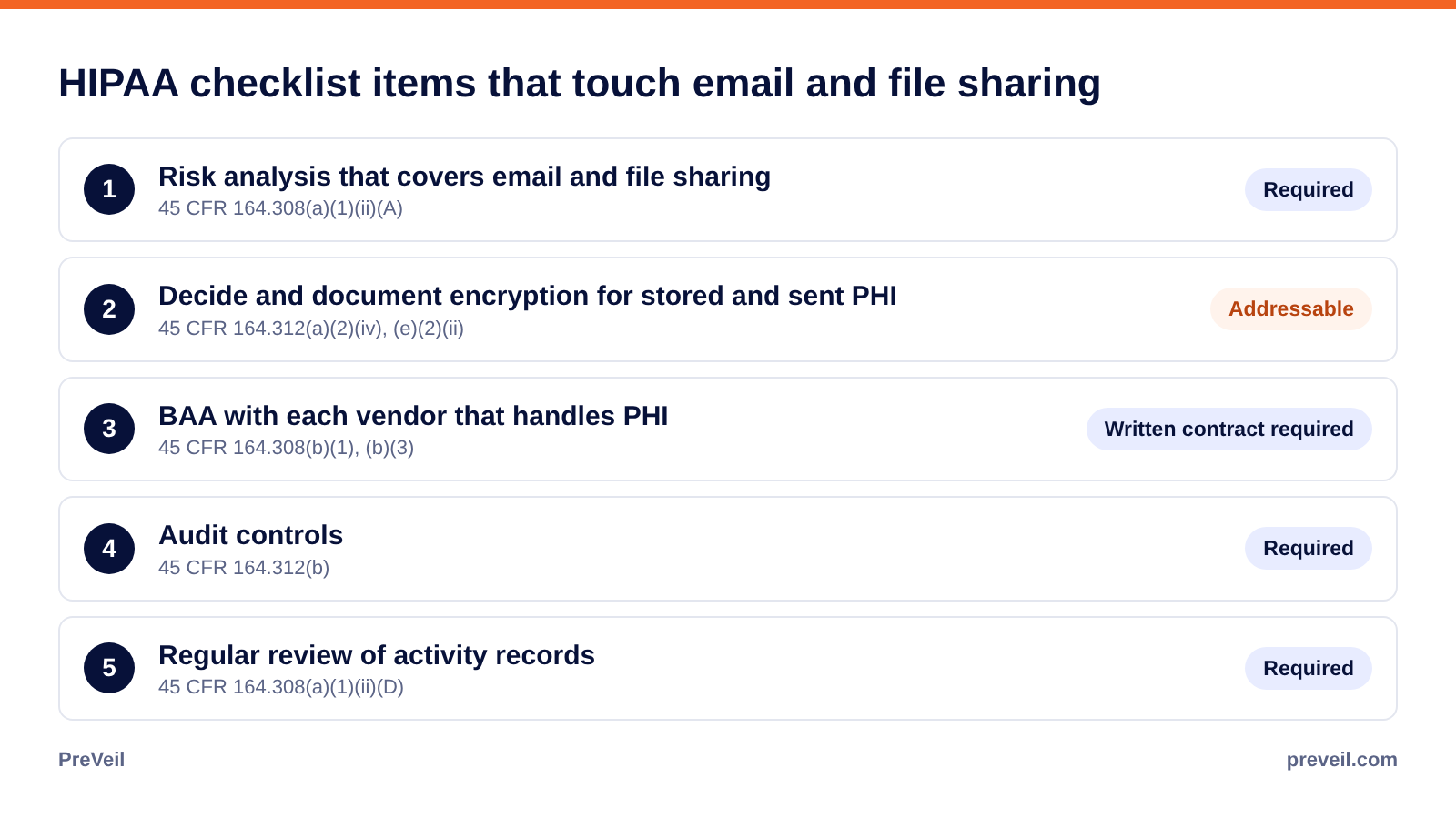
Two more rules sit across the whole list. Policies and documented decisions must be kept for six years from the date they were created or last in effect (164.316(b)(2)(i)), and a breach of unsecured PHI requires notice to affected patients within 60 calendar days of discovery (164.404(b)).
Who is responsible for HIPAA security in a dental or chiropractic office?
Every office must identify “the security official who is responsible for the development and implementation of the policies and procedures” the Security Rule requires (164.308(a)(2)). In a dental or chiropractic office this is usually the owner or the office manager, sometimes with help from an outside IT provider, and the role cannot be left unassigned.
The security official owns the risk analysis, the vendor list and BAAs, the review of activity records and the incident procedures. An outside IT provider that can reach PHI is itself a business associate and needs its own BAA.
What should a dental office’s risk analysis say about email and file sharing?
A dental office’s risk analysis should list where PHI travels by email and file sharing, who receives it, how it is protected in transit and at rest, and what happens if a mailbox or laptop is compromised. Under 164.308(a)(1)(ii)(A), a required specification, it must be “an accurate and thorough assessment” of the risks to PHI.
For a dental office, the usual flows are X-rays and treatment plans sent to oral surgeons and orthodontists, claims correspondence with dental plans, and records requests from other providers. A chiropractic office sends imaging reports, receives referrals from primary care physicians, and sends records to payers and to attorneys handling injury claims. Each flow belongs in the analysis next to the safeguard the office chose for it.
Which vendors need a BAA under HIPAA?
Any vendor that creates, receives, maintains or transmits PHI for the office needs a BAA, including the email provider, cloud storage, online practice management software, a billing company and an outside IT provider. HHS guidance on HIPAA and cloud computing says a cloud provider that stores electronic PHI is a business associate even if it cannot view the data.
A BAA must require the vendor to comply with the Security Rule for electronic PHI, report breaches of unsecured PHI, and pass the same terms down to its subcontractors (164.504(e)(2), 164.314(a)(2)(i)). PreVeil signs a BAA with healthcare practices.
Why do HIPAA encryption and audit logs matter most for office email?
Audit controls are required under 164.312(b), and an email system that keeps no activity record cannot support them. Encryption is addressable, but it decides what happens after an incident: under 164.402, PHI encrypted consistent with HHS guidance is not “unsecured,” so a compromised mailbox or lost laptop holding it does not trigger breach notification.
The HHS guidance to render unsecured PHI unusable, unreadable, or indecipherable adds that decryption tools “should be stored on a device or at a location separate from the data they are used to encrypt or decrypt.” PreVeil is built that way. PreVeil cannot access or decrypt the office’s email or files, because the encryption keys stay on users’ devices, and message contents and attachments are encrypted on the sender’s device and stay encrypted in both mailboxes. The HIPAA encryption requirements guide explains the addressable standard in more detail.
How does PreVeil support a dental or chiropractic office?
PreVeil supports the encryption, BAA and audit items on this checklist inside the Outlook, Gmail or Apple Mail the front desk and clinical staff already use. With PreVeil, specialists, payers and patients read and reply for free from their browser after a one-time sign-up, and their replies stay encrypted. PreVeil Drive shares imaging and other large files with the same encryption.
The office’s PreVeil administrator gets an admin console and system logs on the Business plan, which support checklist items 5 through 8. PreVeil signs a BAA for item 4 and supports item 3 with end-to-end encryption and FIPS 140-3 validated cryptographic modules (certificate #5145). PreVeil lets a solo practice start with a single Business license, and PreVeil deploys in hours rather than as an IT project.
The office still owns its policies, training, backups and risk analysis. For what the Security Rule expects of email specifically, see what HIPAA requires of email.
Frequently asked questions
Do dental offices have to follow HIPAA?
Most likely. Under 45 CFR 160.103, a health care provider “who transmits any health information in electronic form in connection with a transaction covered by this subchapter,” such as an electronic claim, is a covered entity and must follow the HIPAA rules.
Can a dental office email X-rays to a specialist?
Yes. The HHS FAQ on sending electronic PHI by email says the Security Rule does not expressly prohibit it. The office must assess the risk, apply safeguards such as encryption and document the decision.
Is encryption required for a small office?
Not under the current rule. Encryption is addressable under 164.312(a)(2)(iv) and (e)(2)(ii), so the office must assess it and document its decision. Properly encrypted PHI that is lost does not trigger breach notification, and HHS has proposed Security Rule changes that would make encryption required.
Are audit logs required for a chiropractic office?
Yes. Audit controls under 164.312(b) are required for every covered entity regardless of size, along with regular review of activity records under 164.308(a)(1)(ii)(D).
Can PreVeil read an office’s patient records?
No. PreVeil cannot access or decrypt message contents, attachments or files, because the encryption keys stay on users’ devices.
How can an office check its email and file sharing against the Security Rule?
A demo shows how PreVeil encrypts PHI inside the email your office already uses and how PreVeil supports items 3 through 8 on this checklist. Request a demo

