For a tax preparer, how to securely send documents via email comes down to encryption that lets only the preparer and the client open each message and attachment, both in transit and in storage. IRS Publication 4557 tells preparers to “encrypt all sensitive files/emails,” and the FTC Safeguards Rule requires encryption of customer information in transit and at rest. The answers below cover the questions preparers and clients ask most often.
Is it safe to send tax documents via email without encryption?
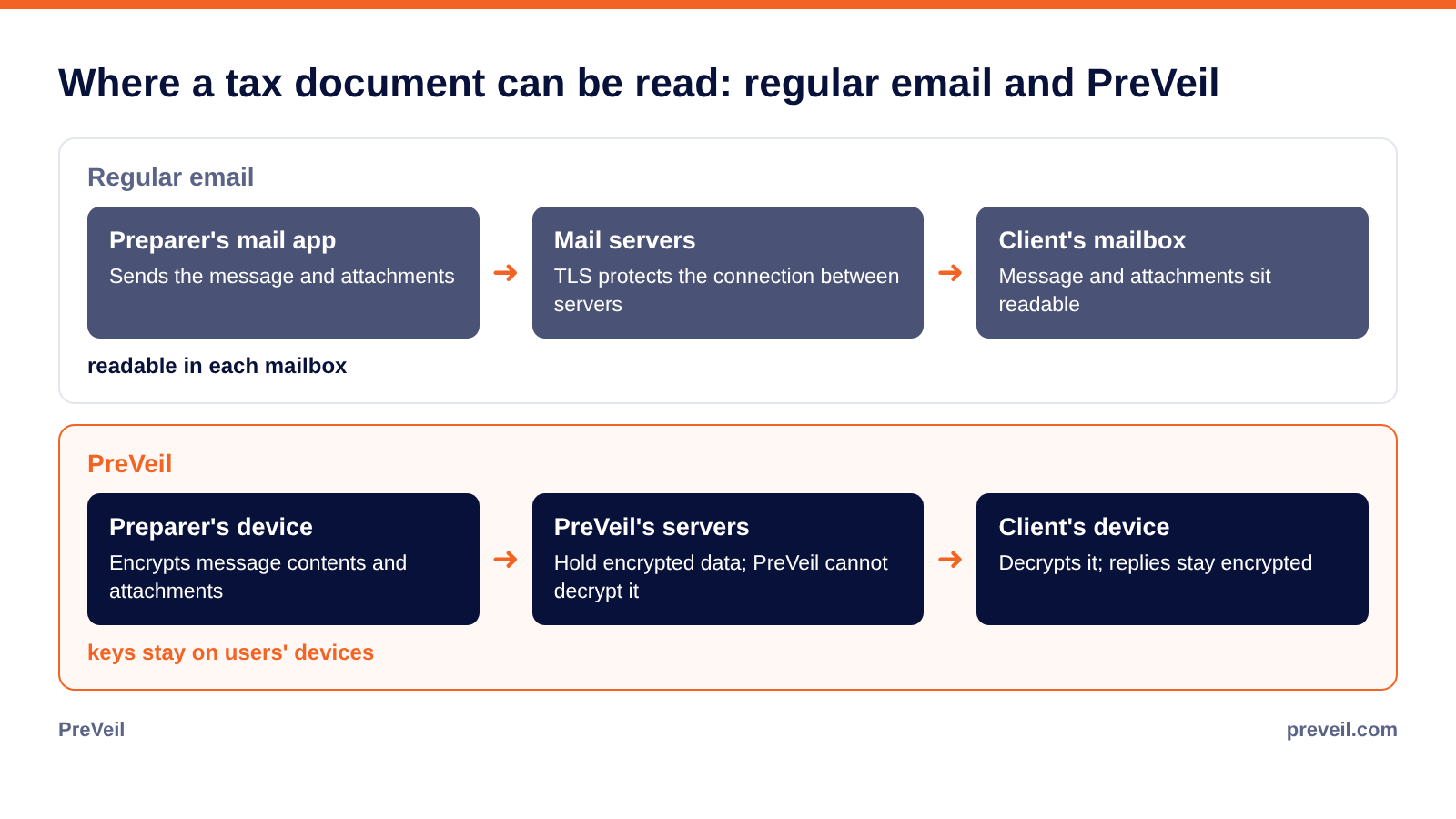
Sending tax documents by regular email is not safe. TLS, the encryption that protects a message as it moves between mail servers, stops at each server, so the message and its attachments sit readable in both mailboxes, where a compromised account, a forward or a lost phone can expose them.
IRS Publication 5708, the IRS sample security plan for tax professionals, says personally identifiable information (PII) “will not be in any unprotected format, such as e-mailed in plain text, rich text, html, or other e-mail formats unless encryption or password protection is present.” Tax documents carry the details identity thieves look for, including Social Security numbers, income, bank account numbers and employer information. Publication 4557 also warns that “a legitimate business will never email and request personal or sensitive information be sent to them via email, unless through a secured mail service.”
What does the IRS say about how to securely send documents via email?
IRS Publication 4557 (Rev. 6-2024) advises preparers to “send only password-protected and encrypted documents if you must share files with clients via email or use Secure File Transfer Protocol (SFTP).” It lists “encrypt all sensitive files/emails” among its basic safeguards, next to multi-factor authentication and anti-malware software, so encryption is the expected default for client files.
The legal requirement behind that advice is the FTC Safeguards Rule (16 CFR Part 314), which treats tax preparers as financial institutions and requires a written information security plan, or WISP. At each PTIN application and renewal, the preparer acknowledges the legal duty to create and maintain a WISP on Form W-12 line 11. The IRS and its Security Summit partners repeated that reminder in news release IR-2026-92.
Is a password-protected PDF secure enough for tax documents?
A password-protected PDF is better than a plain attachment, and Publication 4557 names it as an option, but a password-protected PDF leaves gaps a preparer has to manage. Password strength varies, the password often travels in the same email or a text message, and the client’s reply usually comes back unprotected.
Encryption built into the email itself avoids those extra steps. A firm that relies on password-protected files should state in its WISP how passwords are created and shared and how it handles the documents clients send back. Publication 4557 suggests strong passwords “of 8 or more characters.”
Should clients upload documents to a portal or send encrypted email?
Either a portal or encrypted email can work if client data stays encrypted and the firm can show who accessed it. Portals keep files out of email but ask clients to log in somewhere new, while encrypted email lets clients read and reply for free from their browser. The deciding question is who besides the firm and client can decrypt the files.
Many portals encrypt stored files with keys the vendor manages, so the vendor can decrypt them. With PreVeil, the W-2s and 1099s clients attach to their replies stay encrypted. For a side-by-side view, see Best secure client portals and encrypted email for accountants and tax preparers.
How can clients send tax documents back securely?
The simplest way for a client to send documents back securely is to reply to an encrypted message from the preparer. With PreVeil, the client reads and replies for free from their browser after a one-time sign-up, attaches the documents and sends, and the reply stays encrypted end to end without a password shared by text.
Clients should not send documents as plain attachments, by text message or through personal cloud links with open sharing. The preparer’s engagement letter or welcome email can tell clients which method to use, which also addresses the IRS warning about businesses that request sensitive information by unsecured email.
What if a tax document goes to the wrong person?
When a tax document goes to the wrong person, the firm follows the breach procedures in its WISP. The firm records what was sent, to whom and whether it was encrypted, then decides whether notice is required, since a notification event under 16 CFR 314.2(m) involves unencrypted customer information.
Data counts as unencrypted for that purpose if the encryption key was accessed by an unauthorized person. Events involving 500 or more consumers must be reported to the FTC within 30 days of discovery under 16 CFR 314.4(j). Publication 4557 tells preparers to report data theft to the IRS through their local stakeholder liaison and to contact the states where they file returns, and IRS Publication 1345 (Rev. 12-2025) requires e-file providers to report security incidents to the IRS by the next business day after confirmation. State breach laws can add their own obligations.
Can PreVeil read the tax documents a firm sends?
PreVeil cannot access or decrypt the tax documents a firm sends, because the encryption keys stay on users’ devices. PreVeil uses FIPS 140-3 validated cryptographic modules (certificate #5145), and its SOC 2 Type 2 report is available under NDA on request for the firm’s vendor review.
That matters for the service provider oversight the Safeguards Rule requires under 16 CFR 314.4(f), because a provider that cannot read client data holds none of it in readable form. PreVeil is a PC Magazine Editors’ Choice, is used by 3,000+ organizations and deploys in hours. A solo preparer can start with a single Business license, which includes the admin console and activity logs. For each Safeguards Rule requirement by section, see FTC Safeguards Rule for tax and accounting firms, section by section.
Frequently asked questions
What is the safest way to send tax documents?
Send them encrypted so that only the preparer and the client can open them, in transit and in storage. End-to-end encrypted email or an encrypted portal can both work if the firm documents the method in its WISP.
Can a client email a W-2 to a tax preparer?
Only through a secured method, because plain email leaves the W-2 readable in both mailboxes. Replying to an encrypted message from the preparer, or uploading through the preparer’s encrypted portal, protects it.
Is Gmail or Outlook safe for sending tax returns?
Default Gmail and Outlook use TLS between servers, which does not protect a message once it is stored in a mailbox. An end-to-end encryption add-on such as PreVeil keeps the message and its attachments encrypted inside the mailbox as well.
Do clients need special software to receive encrypted tax documents from PreVeil?
With PreVeil, clients do not need to buy or install anything. They read and reply for free from their browser after a one-time sign-up, and their replies stay encrypted.
What should a preparer do if client data is sent to the wrong address?
Follow the WISP breach procedures, determine whether the data was encrypted, report data theft to the IRS stakeholder liaison, and notify the FTC within 30 days if 500 or more consumers are involved in a notification event.
Talk to PreVeil about sending tax documents securely
A demo shows how your firm would send and receive encrypted tax documents inside the Outlook or Gmail it already uses, and how clients reply for free from their browser. Request a demo

