No email provider makes a practice HIPAA compliant by itself. The provider a practice picks decides whether protected health information (PHI) stays encrypted after it leaves the office, and whether anyone other than the sender and recipient can read it. This guide compares PreVeil, Paubox, Virtru, Microsoft 365 and Google Workspace on those points, using what each vendor states on its own public pages, for dental, chiropractic, therapy, behavioral health and small physician practices.
What should a small practice look for in a HIPAA-compliant email provider?
A small practice should look for four things: a signed BAA, encryption that fits the practice’s risk analysis, audit logs that satisfy the required audit controls standard, and a recipient experience that outside providers and payers will accept. Encryption is addressable under HIPAA, meaning the practice must implement it or document why an alternative measure is reasonable. Properly encrypted PHI that is lost or stolen does not trigger breach notification.
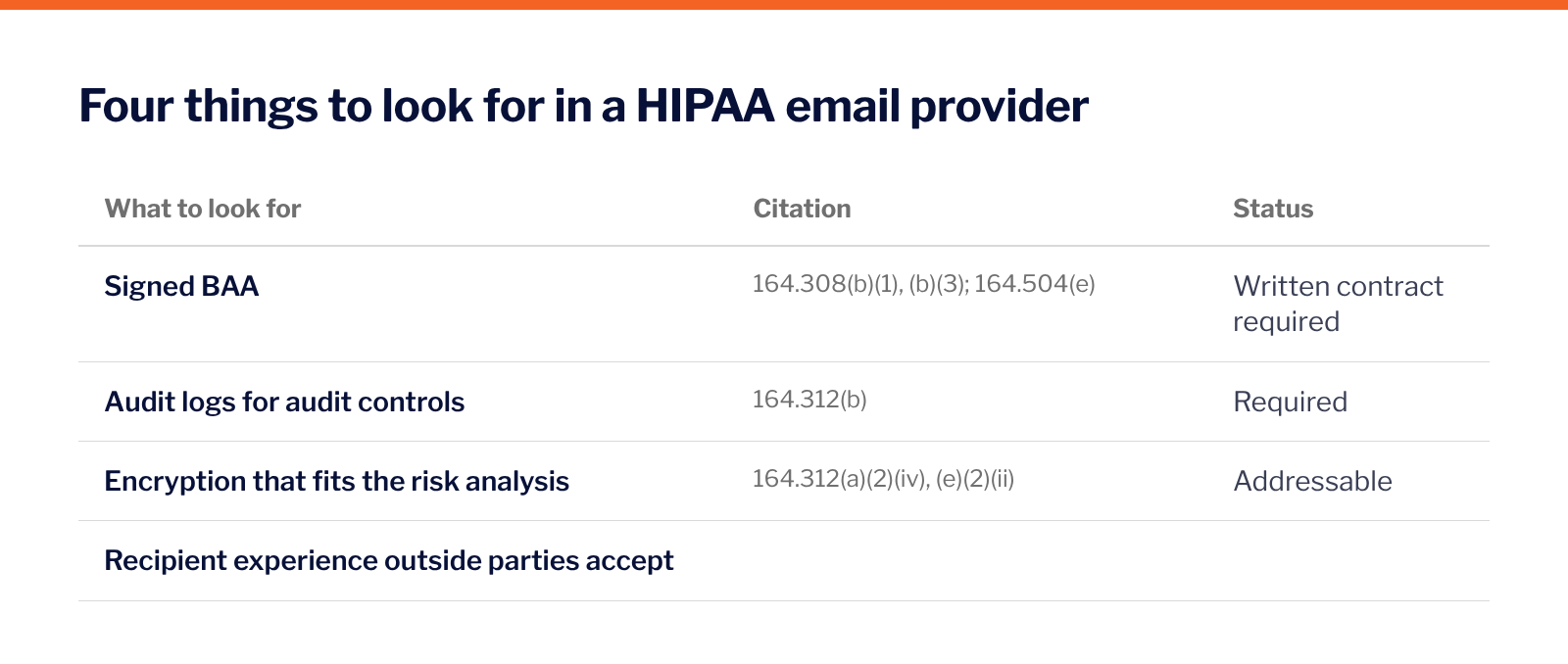
The table below maps each attribute to its HIPAA citation and shows whether the standard is required or addressable.
Two points shape the list. First, HHS guidance on HIPAA and cloud computing treats a cloud provider that stores electronic PHI as a business associate “even if it does not hold a decryption key and therefore cannot view the information,” so every option below needs a BAA. Second, HHS guidance on rendering PHI unusable, unreadable or indecipherable says decryption tools “should be stored on a device or at a location separate from the data they are used to encrypt or decrypt,” which is why key custody is one of the points compared below.
How do the leading HIPAA-compliant email providers compare?
Every provider below offers a BAA, so a signed agreement does not separate them. Three things do: whether a message stays encrypted in the recipient’s inbox, who holds the encryption keys, and which email programs it works in. PreVeil is the only one of the five that meets all three, based on each vendor’s own pages. Prices are left out.
✓ the vendor’s own page confirms it · ◐ partly · ✗ the vendor’s own page shows otherwise · – not stated on the pages reviewed (October 2026)
Why do practices choose PreVeil?
PreVeil encrypts message contents and attachments end to end on the sender’s device, inside Outlook, Gmail or Apple Mail, and signs a BAA. PreVeil cannot access or decrypt a practice’s email or files, because the encryption keys stay on users’ devices. On the Business plan, the admin console and system logs support the required audit controls under 45 CFR 164.312(b).
PreVeil also covers file sharing. Files in PreVeil Drive are encrypted end to end the same way and sync with Windows Explorer and Mac Finder, which suits practices that exchange imaging, referral packets and records with specialists, payers and business associates. Its cryptographic module holds FIPS 140-3 validation (CMVP certificate #5145). More than 3,000 organizations use PreVeil to encrypt email and files end to end.
Outside recipients read and reply for free from their browser, and their replies stay encrypted end to end.
How do the alternatives differ?
Paubox encrypts outbound email and delivers it over TLS (Transport Layer Security, the encryption used between mail servers), so most recipients read it “like any other email” without a portal or passcode. TLS protects a message only in transit. Once it reaches the recipient’s inbox it is no longer encrypted, and anyone with access to that account can read it. The PreVeil vs Paubox comparison covers the two in detail.
Virtru encrypts email and attachments in Gmail and Outlook. Its standard option is fully hosted keys, held by Virtru; customer-held keys require Private Keystore, a separate on-premise service. Virtru offers a signed BAA with most paid packages, not with free Personal Privacy accounts.
Microsoft 365 and Google Workspace both offer a BAA, and both leave compliance to the customer. Microsoft writes that “using Microsoft services doesn’t on its own achieve HIPAA compliance,” and Google states that customers who have not signed its BAA “must not use PHI” in its services. The Gmail, Google Workspace and Microsoft 365 HIPAA comparison covers configuration and how PreVeil adds end-to-end encryption inside both.
Frequently asked questions about HIPAA-compliant email providers
Which email providers will sign a HIPAA BAA?
Every provider in this comparison offers a BAA on the terms each vendor describes: PreVeil, Paubox, Virtru (most paid packages), Microsoft 365 (by default for covered entities and business associates) and Google Workspace (accepted by an administrator).
Is a BAA enough to make email HIPAA compliant?
No. A BAA is required, but the practice still needs a risk analysis, audit controls, activity review, workforce training and documented decisions on addressable specifications such as encryption.
Does HIPAA require email encryption?
Encryption is an addressable implementation specification under 45 CFR 164.312(a)(2)(iv) and 164.312(e)(2)(ii), not a required one. Properly encrypted PHI is not unsecured PHI under 164.402, so its loss does not trigger breach notification.
What is the best HIPAA-compliant email for a small practice?
The best HIPAA-compliant email for a small practice depends on who the practice exchanges PHI with. Practices that send records and files to other providers, payers and business associates benefit from end-to-end encryption that keeps messages encrypted in the recipient’s inbox, a signed BAA and audit logs. PreVeil offers all three, with audit logs on the Business plan.
Can PreVeil read a practice’s email?
No. PreVeil cannot access or decrypt message contents, attachments or files, because the encryption keys stay on users’ devices.
See how PreVeil fits your practice
A demo shows PreVeil working inside Outlook or Gmail and where it fits your Security Rule program.