The FTC Safeguards Rule, at 16 CFR 314.4(c)(3), requires a firm to “protect by encryption all customer information held or transmitted by you both in transit over external networks and at rest.” The rule defines encryption to include “appropriate safeguards for cryptographic key material” (314.2(f)). Email also falls under the rule’s access controls (314.4(c)(1)), multi-factor authentication or MFA (314.4(c)(5)), activity logging (314.4(c)(8)) and service provider oversight (314.4(f)).
How do Outlook and Gmail encrypt email?
Both use TLS (Transport Layer Security) to encrypt messages between mail servers, and both encrypt stored mail on their own servers with keys the provider manages. Microsoft 365 adds Purview Message Encryption on eligible plans. Google Workspace offers hosted S/MIME and, on specific editions, client-side encryption. Each option works differently for recipients.
PreVeil works differently: PreVeil Mail is encrypted from end to end, and the encryption keys are never stored on PreVeil’s servers. This means that only the sender and recipient are able to decrypt messages, and replies are always encrypted.
What does the Safeguards Rule require for email?
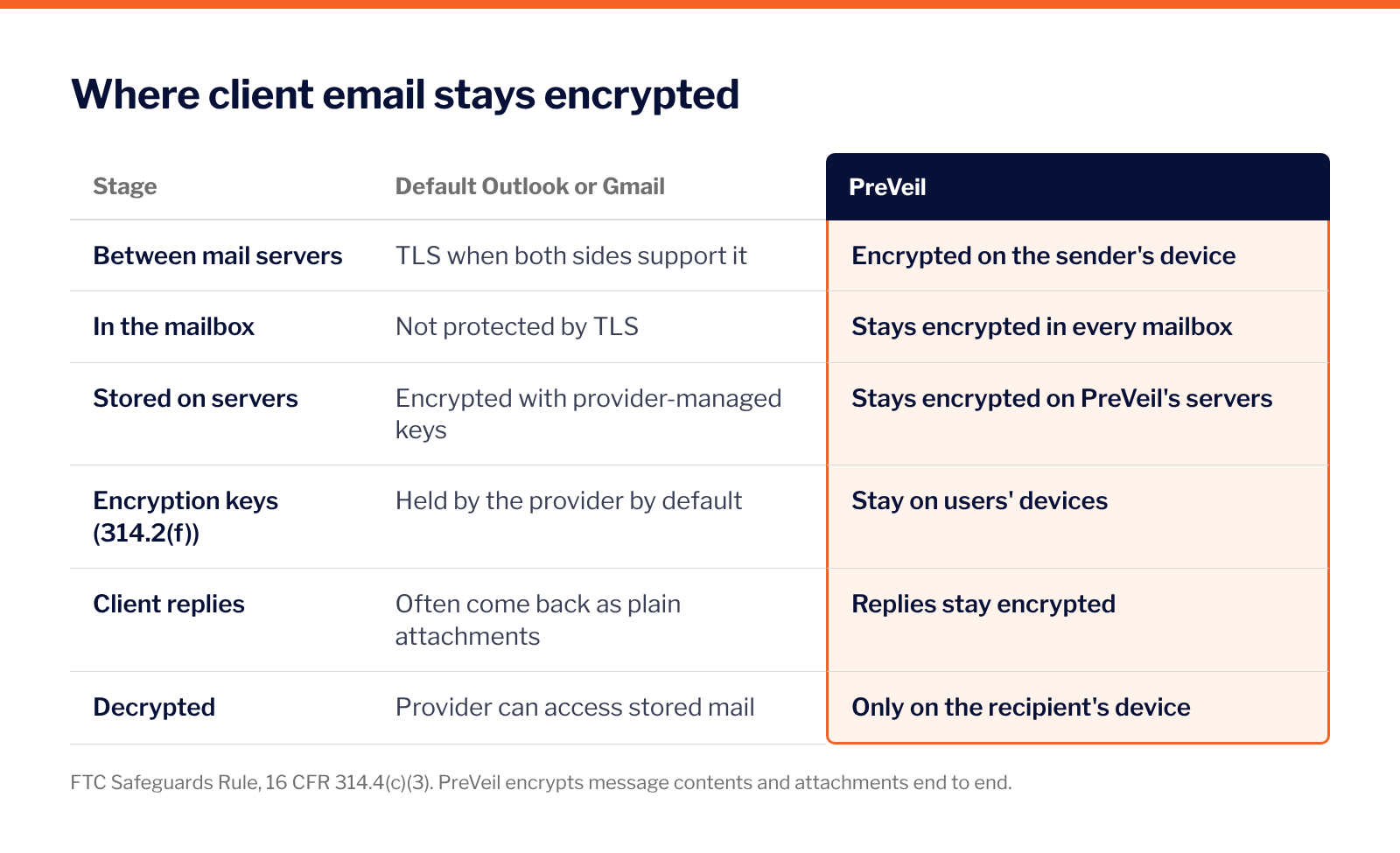
The table below compares default Outlook or Gmail with PreVeil for each Safeguards Rule requirement that touches email.
Where do tax practices usually fall short with Outlook or Gmail?
Tax practices often fall short with Outlook or Gmail in three places:
- Encryption is available but goes unused on the messages that carry returns: optional encryption only works when staff turn it on for each message.
- Client replies come back unencrypted with W-2s and 1099s attached: replies are harder to control, because a client who gets a portal link or passcode often answers with a plain attachment
- The provider holds the keys to every stored message, which the firm has to account for in its vendor review and breach procedures. Key custody matters most when something goes wrong: if the provider manages the keys, an account compromise or a provider-side breach can expose readable mail, which is why 314.2(m) treats data as unencrypted if the key was accessed.
IRS Publication 4557 puts the expectation plainly: “Encrypt all sensitive files/emails, especially those with the taxpayer’s personally identifiable information.”
Is TLS enough under 314.4(c)(3)?
TLS on its own addresses only part of 314.4(c)(3). TLS encrypts the hop between mail servers when both sides support it, which is one piece of “in transit over external networks.” TLS does not protect a message sitting in a mailbox. For encryption at rest, a firm using Outlook or Gmail relies on the provider’s storage encryption, which uses keys the provider manages.
Whether TLS plus provider-managed storage encryption satisfies the Safeguards Rule is the firm’s determination, recorded in the WISP. Where a firm uses alternative controls instead of encryption, its Qualified Individual (the person designated to oversee the security program) has to review and approve them. A firm may decide that returns, W-2s, 1099s and bank details need encryption that holds inside the mailbox as well.
How does PreVeil work with Outlook and Gmail?
PreVeil adds end-to-end encryption inside the Outlook, Gmail or Apple Mail a practice already uses, so staff keep their current inbox. Message contents and attachments sent via PreVeil Mail are encrypted on the sender’s device, stay encrypted on the server and in every mailbox, and are decrypted only on the recipient’s device.
Clients and other external recipients read and reply for free from their browser, and their replies stay encrypted. PreVeil Drive does the same for shared files and folders. PreVeil uses FIPS 140-3 validated cryptographic modules.
PreVeil cannot access or decrypt customer data, because the encryption keys stay on users’ devices.
How should a firm document its email choice in the WISP?
The WISP should name the email platform, the encryption method for client data, who holds the keys, how staff authenticate, where activity logs live and how the vendor was reviewed. If the firm relies on alternative controls instead of encryption for any client data, the Qualified Individual’s written approval belongs in the plan.
IRS Publication 5708, the IRS sample WISP, says personally identifiable information (PII) “will not be in any unprotected format, such as e-mailed in plain text, rich text, html, or other e-mail formats unless encryption or password protection is present.” The full rule is in FTC Safeguards Rule for tax and accounting firms, section by section.
Frequently asked questions
Is Gmail encrypted enough for tax documents?
Gmail uses TLS automatically, which protects messages between servers when both sides support it. Stored mail is encrypted with Google-managed keys. Your firm decides in its WISP whether that satisfies the FTC Safeguards Rule’s encryption requirement, 16 CFR 314.4(c)(3).
Does Microsoft 365 Business Premium include email encryption?
Yes. Microsoft lists Purview Message Encryption as included in Microsoft 365 Business Premium, and in Office 365 and Microsoft 365 E3 and E5. Outside recipients read messages through Microsoft’s encrypted message portal.
Who holds the encryption keys in Outlook and Gmail?
By default, Microsoft and Google manage the encryption keys. Microsoft offers a bring-your-own-key option, and Google offers client-side encryption with an external key service on specific editions. With PreVeil, the encryption keys stay on users’ devices.
Does the FTC Safeguards Rule name specific email products?
No. The FTC Safeguards Rule sets requirements (encryption in transit and at rest, MFA, logging, vendor oversight) and leaves the choice of tools to the firm, which documents it in the WISP.
Can PreVeil read a firm’s messages sent through PreVeil?
No. PreVeil cannot access or decrypt customer data, because the encryption keys stay on users’ devices.
Request a demo
To see how it works with your email, request a demo.