The best secure email and file sharing for a law firm meets its clients’ requirements for protecting their data without pushing clients into a workflow they will not use. This guide compares PreVeil, Virtru, Microsoft 365, Google Workspace and Clio on the three points client questionnaires keep coming back to: whether the tool works inside the firm’s email, whether a message stays encrypted in the client’s inbox, and whether the provider can decrypt the firm’s content.
What should a law firm look for in secure email and file sharing?
A law firm should look for encryption that protects message contents and files in transit and at rest, access that holds up against a stolen password, activity logs, a clear answer on who can decrypt the data, and a recipient experience clients will accept. For firms with regulated clients, add a business associate agreement (BAA) when the work involves protected health information (PHI).
The requirements often come from clients. In the ABA 2023 Cybersecurity TechReport, 27% of respondents had been asked by clients for the firm’s security requirements document or guidelines, and 22% said a client or potential client had asked the firm to complete a security questionnaire. Healthcare clients need a BAA before sharing PHI (45 CFR 164.502(e)). Financial services clients regulated by the New York Department of Financial Services (DFS) must set guidelines for vendors that address, to the extent applicable, multi-factor authentication and encryption (23 NYCRR 500.11(b)). Our guide to law firm security obligations when clients are regulated covers each source.
The ethics baseline is ABA Model Rule 1.6(c), which requires reasonable efforts to prevent unauthorized disclosure of or access to client information. ABA Formal Opinion 477R adds that “particularly strong protective measures, like encryption, are warranted in some circumstances.”
Why does it matter who can decrypt a firm’s data?
Who can decrypt matters because a provider that can decrypt a firm’s email or files can expose them through a breach of its own systems, an insider, or a legal demand served on the provider rather than the firm. Where the keys are held decides whether the provider is a place client data can leak from.
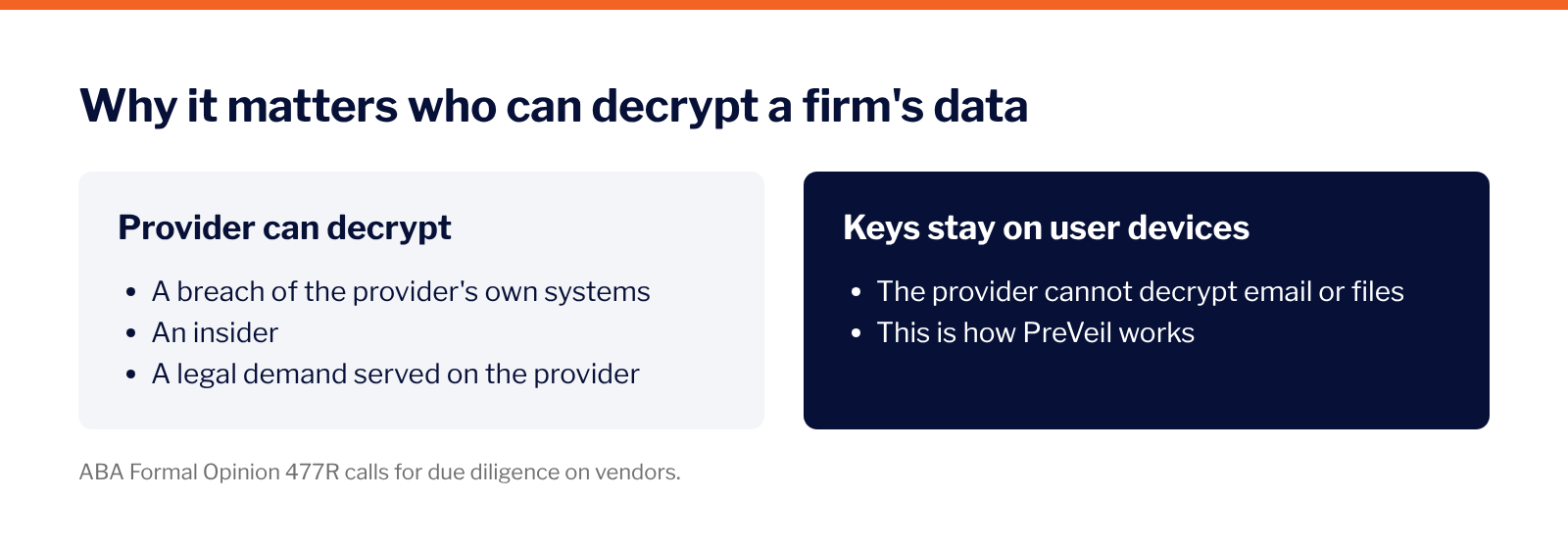
Opinion 477R lists “Conduct Due Diligence on Vendors Providing Communication Technology” among its considerations, and client questionnaires increasingly ask the same question. Based on each vendor’s own pages, PreVeil is the only one of the five options below whose standard setup keeps the provider from decrypting customer content.
How do the leading options compare?
Every option below encrypts data in some form, so encryption alone does not separate them. Three things do: whether it works inside the firm’s Outlook and Gmail, whether a message stays encrypted in the client’s inbox, and whether the provider can decrypt the firm’s content. PreVeil is the only one of the five that meets all three, based on each vendor’s own pages as of October 2026. Prices are left out.
✓ the vendor’s own page confirms it · ◐ partly · ✗ the vendor’s own page shows otherwise · – not stated on the pages reviewed (October 2026)
How do the alternatives differ?
Virtru encrypts email and files inside Outlook and Gmail, and recipients read and reply through a browser. Its fully hosted key option keeps the keys with Virtru. A firm that wants to hold its own keys needs Private Keystore, a separate key service the firm hosts.
Microsoft 365 includes Purview Message Encryption in Business Premium and E3/E5 plans. Microsoft generates and manages the root key by default, and a firm that wants its own key has to set up bring your own key in Azure Key Vault. Recipients on other email services open messages in Microsoft’s encrypted message portal.
Google Workspace offers client-side encryption only on Enterprise Plus, Frontline Plus, Education Standard and Education Plus, and an administrator has to set it up. Without it, Gmail relies on TLS, the encryption used between mail servers, which protects a message only in transit.
Clio shares documents through Clio for Clients, a portal separate from the firm’s email. Clio encrypts data in transit with TLS 1.2 or higher and at rest with AES-256, and its support team can access a firm’s data with the firm’s permission. Every client logs into another system, and email still carries much of the firm’s client communication.
Built-in Microsoft and Google options avoid a new vendor, but the plan tier decides what a firm gets, and so does who holds the keys by default. Our post on whether Outlook or Gmail encryption protects privileged client communications walks through both.
Why do law firms choose PreVeil?
PreVeil encrypts message contents, attachments and files end to end inside the Outlook, Gmail or Apple Mail a firm already uses. It signs a BAA with law firms when the work involves PHI, keeps activity logs in the admin console on the Business plan, and uses a FIPS 140-3 validated cryptographic module (CMVP certificate #5145). More than 3,000 organizations use PreVeil to encrypt email and files end to end.
The table maps the requirements clients pass to their firms to how PreVeil supports each one.
PreVeil cannot access or decrypt customer data, because the encryption keys stay on users’ devices. Clients and co-counsel read and reply for free from their browser, and their replies stay encrypted. Firms deploy PreVeil in hours, with PreVeil’s help or on their own.
See how PreVeil works for law firms on the PreVeil for law firms page.
Frequently asked questions about encrypted email providers
What is the most secure email for a law firm?
The most secure setup is end-to-end encryption where the provider cannot decrypt the content, combined with strong access controls and activity logs. PreVeil provides all three inside Outlook, Gmail and Apple Mail, with activity logs on the Business plan.
Is Microsoft 365 encryption enough for a law firm?
On its own, it often is not. Purview Message Encryption comes only with some plans, Microsoft generates and manages the root key by default, and recipients on other email services read messages in a web portal. PreVeil adds end-to-end encryption inside Outlook, with keys that stay on users’ devices.
Do clients need to install software to read encrypted email from PreVeil?
No. Clients read and reply to PreVeil messages for free from their browser, and their replies stay encrypted.
Does PreVeil sign a BAA with law firms?
Yes. PreVeil signs a business associate agreement (BAA) with law firms when the work involves protected health information (PHI).
Can PreVeil read a law firm’s email or files?
No. Encryption keys stay on users’ devices, so PreVeil cannot decrypt message contents, attachments or files.
See how PreVeil fits your firm
A demo shows PreVeil inside your firm’s Outlook or Gmail and how it answers what your clients ask for.